
WIBTM: Add telemetry and observability to your AI agents
Telemetry and observability give you the means to start capturing data that make your agent systems long running, and improve their capabilities over time.

Most agent examples start with agent instructions, a model, and a few tools, and end there. As a part of a talk I gave at AI4, I tried to create a few agent examples where you can start playing with ‘state’ for an agent in different ways.
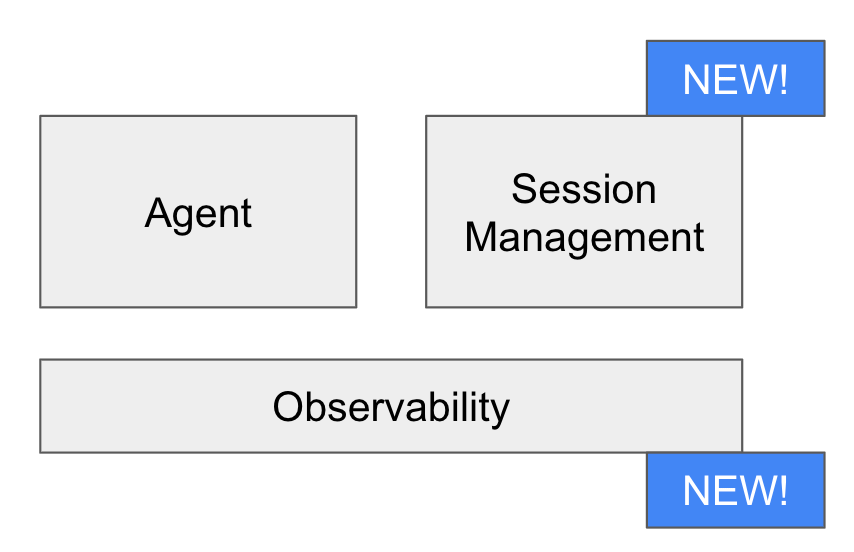
This blog is essentially a recap of my talk and interesting things that I learned.
Why do agents need telemetry, and specifically traces?
In application development, traces that I created in the past were typically viewed as relatively expensive telemetry operations to be used in the event of failure. If you had actually implemented tracing, then you could find which part of a multi-layer system broke.
In agent development, deployment, and monitoring, traces are important to measuring the system performance and keeping the system well tuned. They are not just for finding failure (although they’re good for that too).
In agent telemetry, a trace is commonly referred to as a trajectory. A trajectory represents the steps an agent took based on an input to meet an output. A single trajectory may represent a few traces or spans, but it encapsulates all of the agent logic and decision making. This ultimately means that a trace should also capture all of the prompts and responses within the agent’s reasoning loops.
Telemetry is a powerful tool for us. We can use it for offline analysis to improve our agents, create memories using dreaming, and perform real time analysis which may include shutting down a discussion if safety parameters are violated over the course of a current trajectory. However, telemetry isn’t necessarily a real time input. There are other tools we can use for this.
Other methods and tools we need to capture and use agent state
Most agent examples rely on a simple, in-memory session service (or no session service by simply appending prompts and responses). These are fine for examples, but they lack durability when you start to run agents over time. For example, how would you manage:
Connection failures between the agent and the user
When a user leaves a session but wants to pick up a session later
Storing information securely for an agent over a session that the agent may not necessarily have access to
State is incredibly important in agent design. For those working in data, it’s a tough problem. Managing state over time presents a number of questions like ‘when should the state be reset’ or ‘what state should be saved for even longer’?
For session state, there’s typically a database involved. Databases like Redis / Valkey are great for fast, in memory session management. The agent can write to these whenever it needs to, and you can set a Time To Live to automatically expire information that’s no longer relevant.
You can also use a database like Postgres or Google Cloud Spanner for session management. While it’s not quite as performant, you gain other features like being able to store short and long term memory together, and even tools like graph commands to give your agents more access to information.
Either way, you want to add one of these methods early to an agent so you can understand how it impacts the agent’s behavior as you start to launch.
An example using an agent that is writing SQL over a long running session
I built a simple agent design that demonstrates the impact of state on agents. It’s written using Google Agent Development Kit (ADK), Cloud Run, and Cloud Spanner as the database.
This playground gives you a way to compare and contrast agent behavior. You can use two agents together to see what happens when one agent has access to a database to store sessions over time.
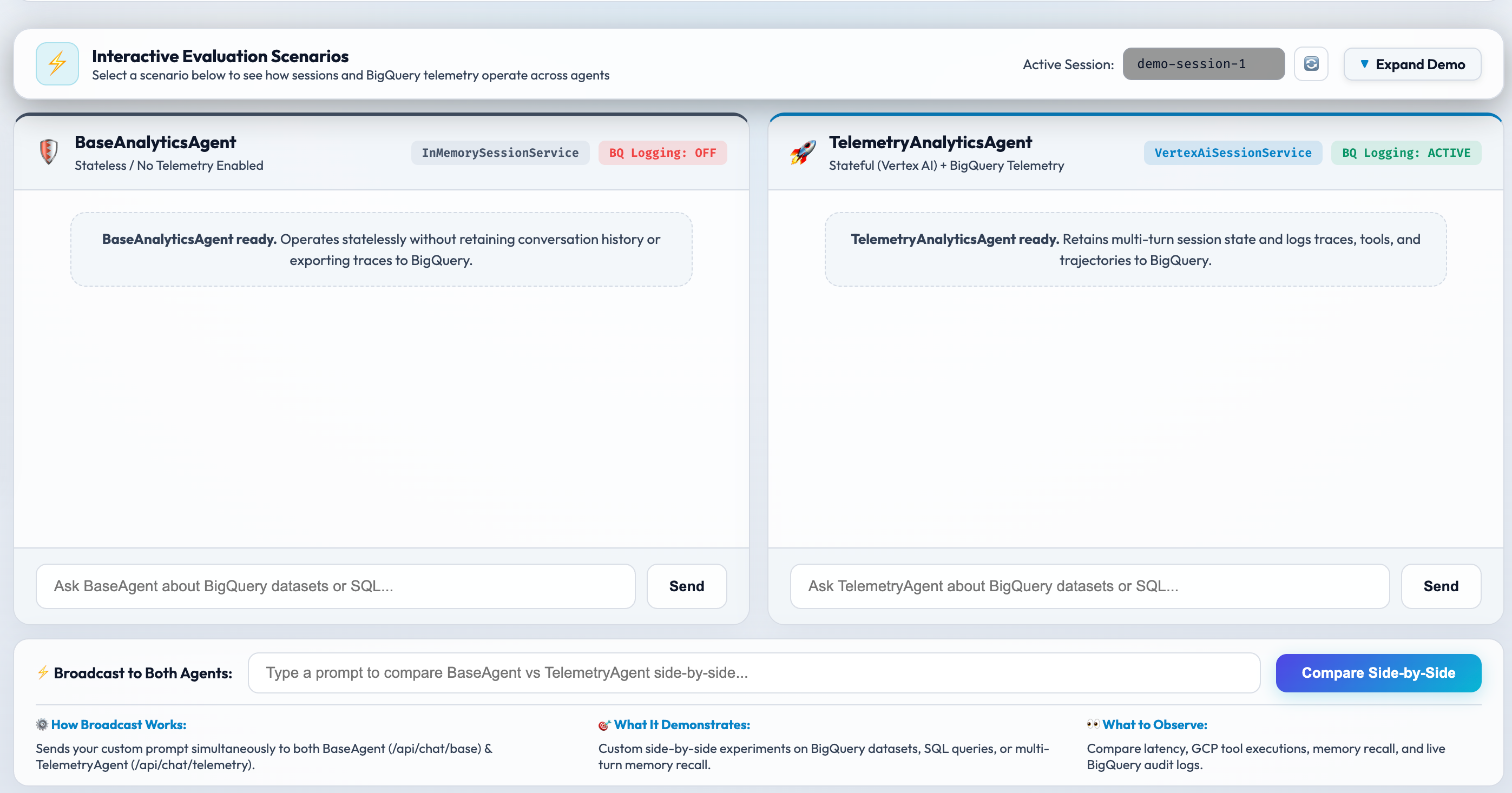
Here’s the code, and here’s how the big pieces work.
Session management
The session service is attached to Google Agent Platform Session service, or Cloud Spanner. You can use any database here though. The point is that the framework, in this case Google ADK, uses the database to log session information so it can be retrieved later. It’s pretty straightforward. Most of your app logic here is focused on when a session should be resumed (if automated), and then how to manage deletion. Here’s the block that creates the Agent Platform Session service. You can use this managed connection or build your own.
class VertexAISessionService(VertexAiSessionService):
    """ADK SessionService backed by Google Cloud Vertex AI Agent Engine Session Service.

    Provides managed multi-turn session persistence using Vertex AI Agent Engine.
    """

    def __init__(
        self,
        project_id: str = DEFAULT_PROJECT,
        location: str = DEFAULT_LOCATION,
        agent_engine_id: Optional[str] = None,
        express_mode_api_key: Optional[str] = None,
    ):
        proj = project_id or DEFAULT_PROJECT
        loc = location or DEFAULT_LOCATION
        engine_id = agent_engine_id or os.environ.get("VERTEX_AGENT_ENGINE_ID")
        super().__init__(
            project=proj,
            location=loc,
            agent_engine_id=engine_id,
            express_mode_api_key=express_mode_api_key,
        )
        self.project_id = proj
        self.location = loc
        self.agent_engine_id = engine_id
Trajectory management
The second part of the agent is the telemetry logger. ADK provides a BigQuery plug-in out of the box. In this case, I wrote a custom logger so the fields were what I wanted to define.
While I see plug-ins still being useful in the future to understand framework capabilities, I think it’s important to call out here that I had Gemini 3.6 Flash essentially single shot a telemetry framework that works. As models become more capable, the math definitely changes with getting a framework with all the tools out of the box vs. having your agents code it yourself. This is a key tradeoff I see many more developers needing to understand in the future.
Here’s an example of the telemetry logging fields:
def log_agent_turn(
    user_id: str,
    session_id: str,
    agent_name: str,
    event_type: str,
    message: Optional[str] = None,
    payload: Optional[Dict[str, Any]] = None,
    project_id: str = DEFAULT_PROJECT,
) -> bool:
    """Inserts a telemetry log record into BigQuery adk_agent_telemetry.agent_logs.

    Args:
        user_id: Unique identifier for the user.
        session_id: Session UUID.
        agent_name: Name of the agent (e.g. 'TelemetryAnalyticsAgent').
        event_type: Type of event ('USER_PROMPT', 'AGENT_RESPONSE', or 'TOOL_TRAJECTORY').
        message: Raw message text.
        payload: Structured telemetry payload (tools called, latency, trace ID, tokens).
        project_id: GCP project ID.

    Returns:
        True if the insert succeeded, False otherwise.
    """

...
The data is logged to a BigQuery table where we can then use this data for more analysis.
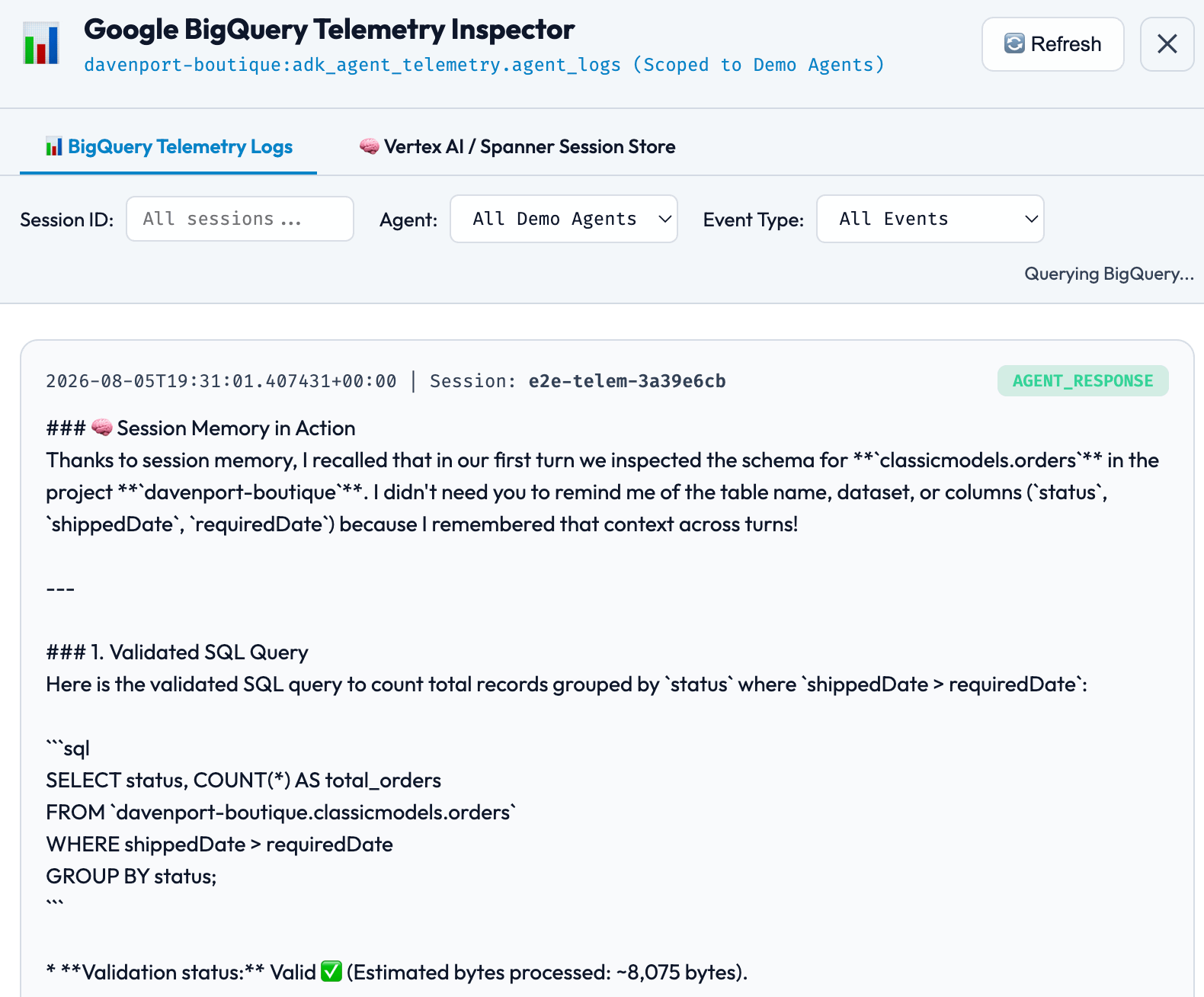
You can also write this data to your operations suite like Cloud Operations or Datadog.
Next steps
Deploy this example and try out some of the agent concepts for yourself, and then start applying them to your own agents. These concepts are the underpinnings for what you need to build agents, manage agent memory, and create a good set of agent evaluations from this data so you can manage agent performance.